
Self-host Langfuse
LLM tracing, evals, and prompts on your own VM. No API keys for the judge.
Shelley handles the setup. About 15 minutes. Needs a 40 GB disk: Shelley sends you a link to grow it.
Prefer a terminal?
curl -fsSL https://exe-staging.dev/deploy/langfuse/prompt.txt | ssh exe.dev new --disk=40GB --prompt=/dev/stdinLangfuse shows you what your LLM apps actually do: every model call, with its prompt, reply, tokens, and latency, grouped into traces you can search. It also keeps your prompts under version control and scores answers with an LLM judge. Here it runs on your own exe.dev VM, so traces, which hold your users' prompts, never leave a machine you control.
exe.dev does the parts that are usually a chore. The VM's disk keeps PostgreSQL and ClickHouse across restarts. The UI is private behind your exe.dev login before Langfuse's own sign-in even appears, and sharing it is one command. Your apps and Langfuse's judges call models through exe.dev's LLM gateway, with no API keys on any VM. And Shelley can set it all up and wire tracing into your other apps.
What you get#
- Langfuse at your VM's private URL on port 3000, with your account, an organization, and a project.
- Open sign-up turned off, and project API keys in ~/langfuse/client.env.
- A test trace of GPT and Claude calls through exe.dev's LLM gateway, with tokens and latency.
- The gateway as an LLM connection, and an LLM-as-a-judge evaluator that scored the test trace.
- Starts again after a reboot; nightly backups, with one checked.
What's running, and where
https://my-langfuse.exe.xyz:3000/
The Langfuse UI and API, behind exe.dev's login, then Langfuse's own
https://my-langfuse.exe.xyz:3000/
Teammates you share the VM with, each with a Langfuse account
https://my-langfuse.exe.xyz/api/public/
Optional. The SDK and OpenTelemetry API only, guarded by Langfuse API keys
Deploy with Shelley#
Click Deploy and Shelley will set up Langfuse on a new VM, then check that it works. No config-file wrangling required.
Langfuse needs a 40 GB disk, more than a new VM has. Shelley checks first and, if it's too small, gives you a link to grow it; the terminal command below makes the VM that size from the start.
Prefer a terminal?
curl -fsSL \
  https://exe-staging.dev/deploy/langfuse/prompt.txt \
  | ssh exe.dev new --disk=40GB --prompt=/dev/stdin
What Shelley is told
Set up Langfuse on this VM by following the exe.dev recipe at https://exe-staging.dev/deploy/langfuse.md?via=deploy from top to bottom.

The recipe's example VM name is my-langfuse. This VM's name is the output of `hostname`: use it wherever the recipe writes my-langfuse. Skip the step that creates the VM; you are on it.

This recipe needs a 40GB disk, and a new VM's may be smaller. Before you install anything, run `df -h /`. If its size is under 36G, stop and ask me to grow the disk, either with this link: https://exe.dev/suggest?command=resize%20my-langfuse%20--disk%3D40GB or, on my computer, with `ssh exe.dev resize my-langfuse --disk=40GB`. When I say it's done, run `sudo resize2fs "$(findmnt -no SOURCE /)"`, check `df -h /` again, and carry on.

You are done when all of these are true. Check each one yourself:
- Langfuse at your VM's private URL on port 3000, with your account, an organization, and a project.
- Open sign-up turned off, and project API keys in ~/langfuse/client.env.
- A test trace of GPT and Claude calls through exe.dev's LLM gateway, with tokens and latency.
- The gateway as an LLM connection, and an LLM-as-a-judge evaluator that scored the test trace.
- Starts again after a reboot; nightly backups, with one checked.

Read the whole recipe, including the closed details. For initial setup,
follow "Install by hand" first, skipping VM creation and SSH but doing the
disk check. Then stop: the sections above it are for the owner.
Do not run Restore, Update, or anything under "Trace apps on other
machines" unless the owner asks. Work as exedev in ~/langfuse. Never
overwrite an existing .env.
Make the VM's owner the Langfuse account, using the email from the
reflection integration; if it prints nothing, ask the user for their
exe.dev email. At the end, tell the owner their Langfuse email and
where the password is (~/langfuse/.env, LANGFUSE_INIT_USER_PASSWORD), not
the password itself. Don't share the VM or make it public.
Verify docker.service is enabled and the containers use unless-stopped;
do not reboot.

Finish with the URLs I should open.
Also at /deploy/langfuse/prompt.txt. The recipe it follows is /deploy/langfuse.md.
Open Langfuse#
Open https://my-langfuse.exe.xyz:3000/ (with your VM's name). Sign in to
exe.dev if you're asked, then sign in to Langfuse with your exe.dev email
and the password setup made for you. On the VM:
grep -E '^LANGFUSE_INIT_USER_(EMAIL|PASSWORD)=' ~/langfuse/.env
Save it in your password manager. You own an organization named after the
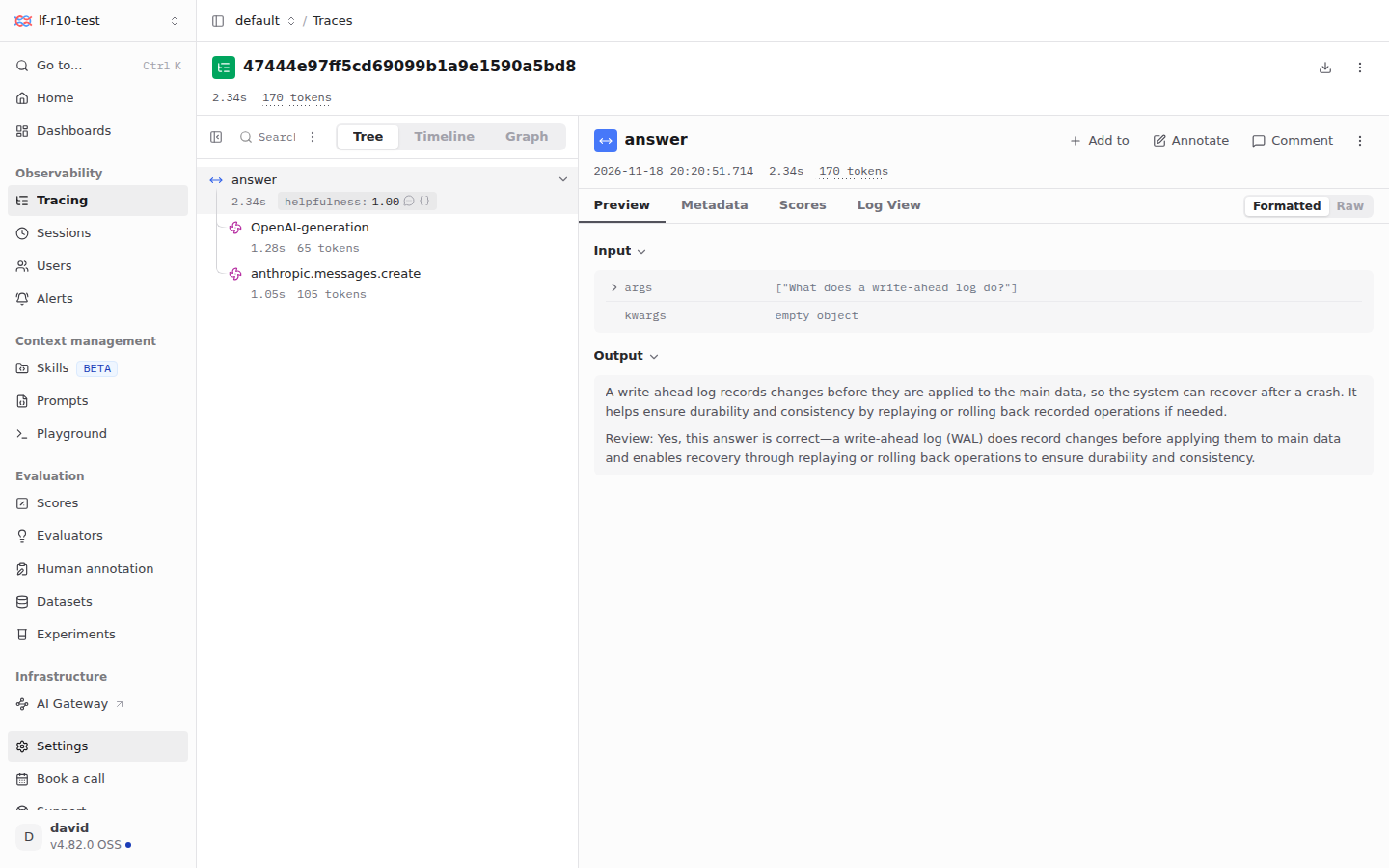
VM, with one project, default. Open Tracing to see the test trace
from setup, with a GPT call, a Claude call, and a helpfulness score.
Sign-up is turned off, so nobody else can make an account, even after you share the VM. Bring your team turns it on for the people you choose.
Trace an app on the VM#
Setup left two things in ~/langfuse: client.env, with the project's API
keys, and hello_langfuse.py, a small app that asks GPT a question and has
Claude review the answer, both through the gateway. Run it with a question
of your own:
cd ~/langfuse
set -a; . ./client.env; set +a
uv run hello_langfuse.py "What does a write-ahead log do?"
It prints a trace ID and the answer. The trace appears under Tracing within a few seconds. The script shows the three usual ways in:
- OpenAI SDK.
from langfuse.openai import OpenAIinstead offrom openai import OpenAI, withbase_url="https://llm.int.exe.xyz/v1". Every call becomes a generation with model, tokens, and latency. - Anthropic SDK. Recent versions report their own OpenTelemetry spans; pass
open_telemetry={"traces": {"content_mode": "content"}}to include prompts and replies, andbase_url="https://llm.int.exe.xyz". @observe(). Wraps any function in a span, so one request's calls land in one trace.
The Langfuse SDKs read LANGFUSE_PUBLIC_KEY, LANGFUSE_SECRET_KEY, and
LANGFUSE_BASE_URL from the environment, which is all client.env sets.
Apps on this VM use http://localhost:3000. Anything else that speaks
OpenTelemetry can send traces too:
export OTEL_EXPORTER_OTLP_ENDPOINT=http://localhost:3000/api/public/otel
export OTEL_EXPORTER_OTLP_HEADERS="Authorization=Basic%20$(printf %s "$LANGFUSE_PUBLIC_KEY:$LANGFUSE_SECRET_KEY" | base64 -w0)"
Ask Shelley on another VM to "add Langfuse tracing to this app" and point it at this page; it knows the gateway already.
Trace apps on other machines#
Port 3000 is private, so a request from another VM or your laptop gets
exe.dev's 401 before it reaches Langfuse. Pick one of three ways in.
From another exe.dev VM, with no token. Give that VM a VM-to-VM integration to Langfuse. On your computer:
ssh exe.dev integrations add http-proxy --name=langfuse \
  --target=https://my-langfuse.exe.xyz:3000/ --peer --attach=vm:my-app
On my-app, set LANGFUSE_BASE_URL=https://langfuse.int.exe.xyz along with
the two keys. exe.dev adds a key at the network edge that my-app never sees, and
only the VMs you attach can use it.
From your laptop or anywhere else, with a token. Make a token that opens this VM's HTTPS ports. On your computer:
ssh exe.dev ssh-key generate-api-key --vm=my-langfuse --label=langfuse-laptop --exp=1y
Send it in the X-Exedev-Authorization header, which exe.dev's proxy
checks and removes. With the Python SDK, keys in the environment as usual
and LANGFUSE_BASE_URL=https://my-langfuse.exe.xyz:3000:
import os
from langfuse import Langfuse

langfuse = Langfuse(additional_headers={
    "X-Exedev-Authorization": "Bearer " + os.environ["EXE_VM_TOKEN"],
})
With plain OpenTelemetry, add it to the headers, after a comma:
OTEL_EXPORTER_OTLP_HEADERS="Authorization=Basic%20...,X-Exedev-Authorization=Bearer%20$EXE_VM_TOKEN".
The token gets its holder past exe.dev's login to every port on this VM,
though not past Langfuse's. Keep it secret, add --ips= for a fixed
address, and revoke it with ssh exe.dev ssh-key remove langfuse-laptop.
From servers you don't control, with a public door. Some hosted
platforms can't add headers. Run a small Caddy proxy on port 8000 that
passes /api/public/ and nothing else, and make only that port public.
On the VM:
cd ~/langfuse
cat > Caddyfile <<'EOF'
:8000 {
	handle /api/public/* {
		reverse_proxy langfuse-web:3000
	}
	handle {
		respond "Not found" 404
	}
}
EOF
cat > compose.override.yaml <<'EOF'
# A public, API-only door to Langfuse on port 8000. The UI and sign-in
# stay on port 3000, behind exe.dev's login.
services:
  ingest:
    image: docker.io/caddy:2.11
    restart: unless-stopped
    depends_on: [langfuse-web]
    ports:
      - "8000:8000"
    volumes:
      - ./Caddyfile:/etc/caddy/Caddyfile:ro
EOF
docker compose up -d
curl -fsS http://localhost:8000/api/public/health; echo
curl -s -o /dev/null -w '%{http_code}\n' http://localhost:8000/auth/sign-in
Expect a health line with the version, then 404. On your computer:
ssh exe.dev share set-public my-langfuse
Apps then use LANGFUSE_BASE_URL=https://my-langfuse.exe.xyz and their keys.
Anyone on the internet can now reach Langfuse's public API, and its keys
are all that stands in the way. A public key and secret key pair can read
that project's traces and prompts as well as write them, so give each app
its own project when that matters, and rotate keys under Settings → API
Keys. ssh exe.dev share set-private my-langfuse closes the door again.
Score answers with an LLM judge#
Setup added exe.dev's gateway as an LLM connection named exe-gateway,
and an evaluator, helpfulness, that asks gpt-5.4-mini to rate every
span named answer from 0 to 1, with a sentence of reasoning. That's how
the test trace got its score. Open Evaluators to see it, or Scores
for every score so far.
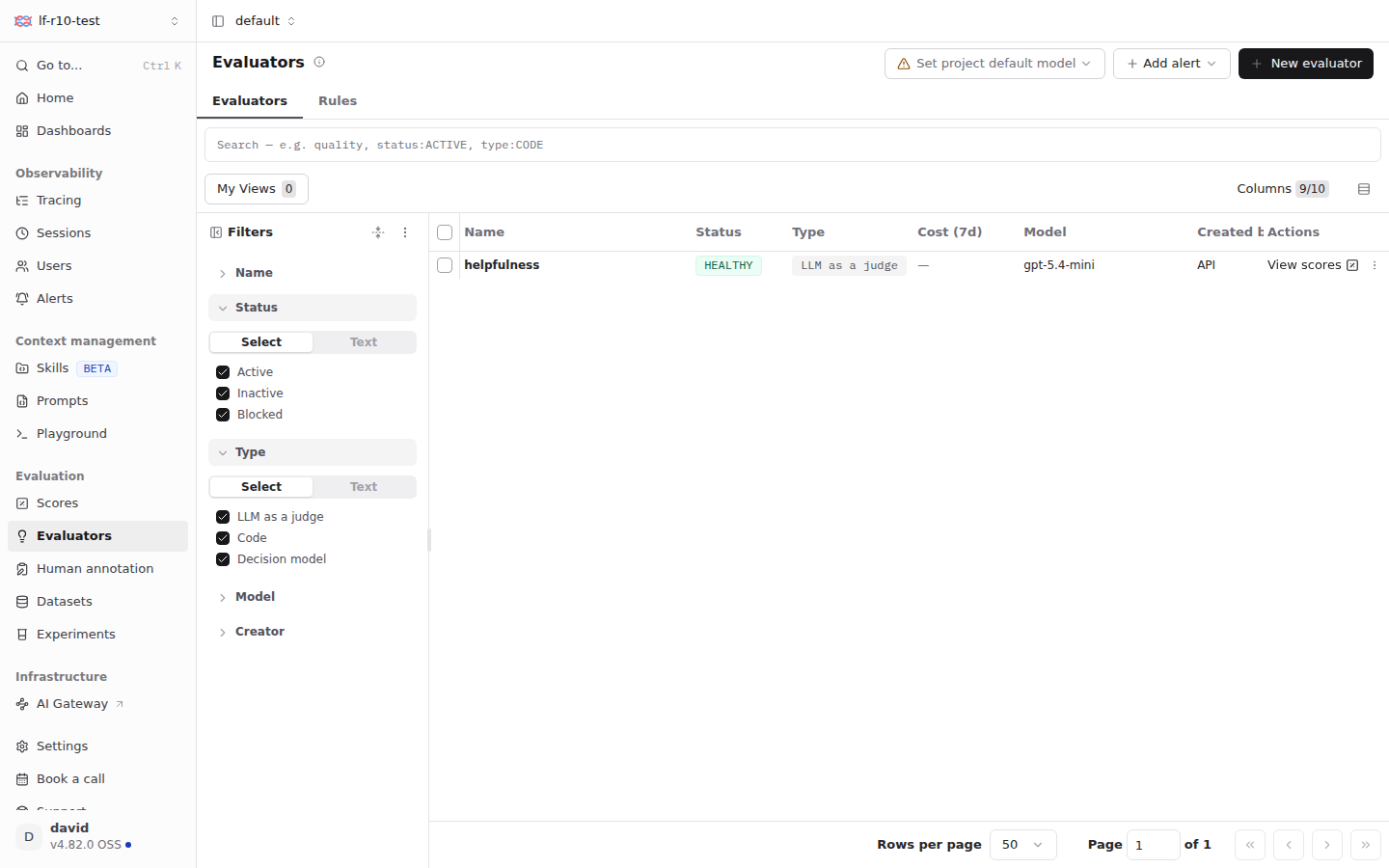
For your own app, click New evaluator and start from a template such
as Check Correctness, or write your own prompt. Choose exe-gateway
and a model, map the template's variables to the observation's input and
output, and on the Rules tab pick which observations it runs on. Each
score is one model call from your LLM allocation, so sample busy apps with
a lower rate. Set project default model at the top makes exe-gateway
the choice for new evaluators. The gateway connection lists
gpt-5.4-mini, gpt-5.5, and gpt-6-luna; add other gateway models
under Settings → LLM Connections. The Playground uses the same
connection.
Manage prompts#
Keep prompts in Langfuse and your apps fetch them by name, so you can
change a prompt without a deploy. Each change is a new version; the
production label marks the one apps get. Linking a call to its prompt
version lets you compare versions in Prompts:
from langfuse import get_client
from langfuse.openai import OpenAI

langfuse = get_client()
prompt = langfuse.get_prompt("explain")  # the production version, cached
gpt = OpenAI(base_url="https://llm.int.exe.xyz/v1", api_key="exe-llm-gateway")
reply = gpt.chat.completions.create(
    model="gpt-5.4-mini",
    messages=[{"role": "user", "content": prompt.compile(topic="a write-ahead log")}],
    langfuse_prompt=prompt,
)
Create explain first under Prompts → New prompt, with the text
Explain {{topic}} to a new engineer in two sentences. and the
production label.
Bring your team#
exe.dev's login already sits in front of Langfuse, so its sign-up page is safe to open to the people you share the VM with. On the VM, turn sign-up on:
cd ~/langfuse
sed -i 's/^AUTH_DISABLE_SIGNUP=.*/AUTH_DISABLE_SIGNUP=false/' .env
docker compose up -d
Then, on your computer, share the VM:
ssh exe.dev share add my-langfuse teammate@example.com
They open the same URL, sign in to exe.dev, and click Sign up in
Langfuse. New accounts join your organization as members, with access to
its projects; change roles under Settings → Organization Settings → Members. Once everyone
has an account, set AUTH_DISABLE_SIGNUP=true again and run
docker compose up -d. ssh exe.dev share remove my-langfuse teammate@example.com
locks someone out at exe.dev's door; remove their Langfuse membership too.
Keep your traces#
Backups run nightly into ~/langfuse-backups: a PostgreSQL dump plus
ClickHouse's traces and scores, the raw events, and .env. Keep a copy
off the VM. On your computer:
scp -r my-langfuse.exe.xyz:langfuse-backups .
Keep these files private: they hold your traces, and .env holds every
secret. To restore one or to update Langfuse, see the sections below, or
ask Shelley. Something stuck? On the VM, try
cd ~/langfuse && docker compose ps and
docker compose logs --tail=100 langfuse-web langfuse-worker.
The nuts and bolts#
Happy clicking Deploy? You can stop here. These are the same setup steps Shelley follows, plus the maintenance commands for later.
Install by hand
Create a VM#
On your computer (pick another name if my-langfuse is taken):
ssh exe.dev new --name=my-langfuse --disk=40GB
ssh my-langfuse.exe.xyz
All remaining installation commands run on the VM, as exedev.
Commands use hostname, so your VM can have any name.
Room on the disk#
The images take about 5 GB, and traces and backups grow from there. Check the disk:
df -h /
If Size is under 36G, the VM was made with a smaller disk. Grow it with
this link
(with your VM's name), or on your computer with
ssh exe.dev resize my-langfuse --disk=40GB. Then, back on the VM, grow the
filesystem to match:
sudo resize2fs "$(findmnt -no SOURCE /)"
df -h /
Get Docker ready#
Langfuse runs as six containers under Docker Compose. Enable Docker at
boot, or exe.dev's on-demand Docker won't restart Langfuse after a reboot.
Install jq and uv if needed:
sudo systemctl enable --now docker.service
systemctl is-enabled docker.service
command -v jq >/dev/null || sudo apt-get install -y jq
command -v uv >/dev/null || curl -LsSf https://astral.sh/uv/install.sh | sh
The check should print enabled.
Write the settings#
This makes ~/langfuse/.env, readable only by you, with random secrets,
the Langfuse version, the VM's URL, and the first account, organization,
project, and API keys. Langfuse creates those on its first start. It never
overwrites an existing .env:
mkdir -p ~/langfuse && cd ~/langfuse
if [ ! -e .env ]; then
  owner=$(curl -fsS https://reflection.int.exe.xyz/email | jq -r '.email // empty')
  touch .env && chmod 600 .env
  cat >> .env <<ENV
LANGFUSE_VERSION=4.82.0
NEXTAUTH_URL=https://$(hostname).exe.xyz:3000
NEXTAUTH_SECRET=$(openssl rand -hex 32)
SALT=$(openssl rand -hex 32)
ENCRYPTION_KEY=$(openssl rand -hex 32)
POSTGRES_PASSWORD=$(openssl rand -hex 24)
CLICKHOUSE_PASSWORD=$(openssl rand -hex 24)
REDIS_AUTH=$(openssl rand -hex 24)
S3_SECRET_KEY=$(openssl rand -hex 24)
AUTH_DISABLE_SIGNUP=true
LANGFUSE_INIT_ORG_ID=exe
LANGFUSE_INIT_ORG_NAME=$(hostname)
LANGFUSE_INIT_PROJECT_ID=default
LANGFUSE_INIT_PROJECT_NAME=default
LANGFUSE_INIT_PROJECT_PUBLIC_KEY=pk-lf-$(openssl rand -hex 16)
LANGFUSE_INIT_PROJECT_SECRET_KEY=sk-lf-$(openssl rand -hex 16)
LANGFUSE_INIT_USER_EMAIL=$owner
LANGFUSE_INIT_USER_NAME=${owner%@*}
LANGFUSE_INIT_USER_PASSWORD=Lf1-$(openssl rand -hex 12)
ENV
fi
grep -E '^(NEXTAUTH_URL|LANGFUSE_INIT_USER_EMAIL)=' .env
Check the URL has your VM's name and the email is yours. If the email is
empty, the reflection integration didn't answer: put the email you sign in
to exe.dev with after LANGFUSE_INIT_USER_EMAIL= and its first part after
LANGFUSE_INIT_USER_NAME=, with nano .env.
Save the project keys for the SDKs, and the S3 credentials for SeaweedFS:
cd ~/langfuse
(umask 077
 echo "LANGFUSE_BASE_URL=http://localhost:3000" > client.env
 sed -n 's/^LANGFUSE_INIT_PROJECT_PUBLIC_KEY=/LANGFUSE_PUBLIC_KEY=/p;
         s/^LANGFUSE_INIT_PROJECT_SECRET_KEY=/LANGFUSE_SECRET_KEY=/p' .env >> client.env
 s3_secret=$(sed -n 's/^S3_SECRET_KEY=//p' .env)
 cat > s3.json <<JSON
{
  "identities": [
    {
      "name": "langfuse",
      "credentials": [{"accessKey": "langfuse", "secretKey": "$s3_secret"}],
      "actions": ["Admin", "Read", "Write", "List", "Tagging"]
    }
  ]
}
JSON
)
cut -d= -f1 client.env
Expect the three variable names.
Write the Compose file#
This follows Langfuse's own
docker-compose.yml,
with a pinned version, data in ~/langfuse/data, only port 3000 open, and
SeaweedFS in place of MinIO, whose open-source repository is archived:
cd ~/langfuse
cat > compose.yaml <<'EOF'
# Langfuse v4 on one exe.dev VM: web, worker, PostgreSQL, ClickHouse,
# Redis, and SeaweedFS for S3. Based on Langfuse's docker-compose.yml.
# Secrets and settings come from .env in this directory.
name: langfuse

x-langfuse-env: &langfuse-env
  NEXTAUTH_URL: ${NEXTAUTH_URL}
  DATABASE_URL: postgresql://postgres:${POSTGRES_PASSWORD}@postgres:5432/postgres
  SALT: ${SALT}
  ENCRYPTION_KEY: ${ENCRYPTION_KEY}
  TELEMETRY_ENABLED: "false"
  CLICKHOUSE_MIGRATION_URL: clickhouse://clickhouse:9000
  CLICKHOUSE_URL: http://clickhouse:8123
  CLICKHOUSE_USER: clickhouse
  CLICKHOUSE_PASSWORD: ${CLICKHOUSE_PASSWORD}
  CLICKHOUSE_CLUSTER_ENABLED: "false"
  REDIS_HOST: redis
  REDIS_PORT: "6379"
  REDIS_AUTH: ${REDIS_AUTH}
  # Raw events go to SeaweedFS, inside Docker's network.
  LANGFUSE_S3_EVENT_UPLOAD_BUCKET: langfuse
  LANGFUSE_S3_EVENT_UPLOAD_PREFIX: events/
  LANGFUSE_S3_EVENT_UPLOAD_REGION: us-east-1
  LANGFUSE_S3_EVENT_UPLOAD_ENDPOINT: http://seaweedfs:8333
  LANGFUSE_S3_EVENT_UPLOAD_ACCESS_KEY_ID: langfuse
  LANGFUSE_S3_EVENT_UPLOAD_SECRET_ACCESS_KEY: ${S3_SECRET_KEY}
  LANGFUSE_S3_EVENT_UPLOAD_FORCE_PATH_STYLE: "true"
  # exe.dev's LLM gateway has a link-local address, which Langfuse refuses
  # for LLM connections unless the host is listed here.
  LANGFUSE_LLM_CONNECTION_WHITELISTED_HOST: llm.int.exe.xyz

services:
  langfuse-web:
    image: docker.langfuse.com/langfuse/langfuse:${LANGFUSE_VERSION}
    restart: unless-stopped
    depends_on: &depends
      postgres: { condition: service_healthy }
      clickhouse: { condition: service_healthy }
      redis: { condition: service_healthy }
      seaweedfs: { condition: service_healthy }
    ports:
      - "3000:3000"
    environment:
      <<: *langfuse-env
      NEXTAUTH_SECRET: ${NEXTAUTH_SECRET}
      AUTH_DISABLE_SIGNUP: ${AUTH_DISABLE_SIGNUP}
      # If you turn sign-up on for teammates, they join your organization.
      LANGFUSE_DEFAULT_ORG_ID: ${LANGFUSE_INIT_ORG_ID}
      LANGFUSE_DEFAULT_ORG_ROLE: MEMBER
      # First start: your organization, project, API keys, and account.
      LANGFUSE_INIT_ORG_ID: ${LANGFUSE_INIT_ORG_ID}
      LANGFUSE_INIT_ORG_NAME: ${LANGFUSE_INIT_ORG_NAME}
      LANGFUSE_INIT_PROJECT_ID: ${LANGFUSE_INIT_PROJECT_ID}
      LANGFUSE_INIT_PROJECT_NAME: ${LANGFUSE_INIT_PROJECT_NAME}
      LANGFUSE_INIT_PROJECT_PUBLIC_KEY: ${LANGFUSE_INIT_PROJECT_PUBLIC_KEY:-}
      LANGFUSE_INIT_PROJECT_SECRET_KEY: ${LANGFUSE_INIT_PROJECT_SECRET_KEY:-}
      LANGFUSE_INIT_USER_EMAIL: ${LANGFUSE_INIT_USER_EMAIL:-}
      LANGFUSE_INIT_USER_NAME: ${LANGFUSE_INIT_USER_NAME:-}
      LANGFUSE_INIT_USER_PASSWORD: ${LANGFUSE_INIT_USER_PASSWORD:-}

  langfuse-worker:
    image: docker.langfuse.com/langfuse/langfuse-worker:${LANGFUSE_VERSION}
    restart: unless-stopped
    depends_on: *depends
    environment:
      <<: *langfuse-env

  postgres:
    image: docker.io/postgres:17
    restart: unless-stopped
    environment:
      POSTGRES_USER: postgres
      POSTGRES_PASSWORD: ${POSTGRES_PASSWORD}
      POSTGRES_DB: postgres
      TZ: UTC
      PGTZ: UTC
    volumes:
      - ./data/postgres:/var/lib/postgresql/data
    healthcheck:
      test: ["CMD-SHELL", "pg_isready -U postgres"]
      interval: 3s
      timeout: 3s
      retries: 10

  clickhouse:
    image: docker.io/clickhouse/clickhouse-server:26.3.62.3
    restart: unless-stopped
    user: "101:101"
    environment:
      CLICKHOUSE_DB: default
      CLICKHOUSE_USER: clickhouse
      CLICKHOUSE_PASSWORD: ${CLICKHOUSE_PASSWORD}
    volumes:
      - ./data/clickhouse:/var/lib/clickhouse
      - ./data/clickhouse-logs:/var/log/clickhouse-server
    healthcheck:
      test: wget --no-verbose --tries=1 --spider http://localhost:8123/ping || exit 1
      interval: 5s
      timeout: 5s
      retries: 10

  redis:
    image: docker.io/redis:7
    restart: unless-stopped
    command: --requirepass ${REDIS_AUTH} --maxmemory-policy noeviction
    volumes:
      - ./data/redis:/data
    healthcheck:
      test: ["CMD", "redis-cli", "ping"]
      interval: 3s
      timeout: 10s
      retries: 10

  seaweedfs:
    image: docker.io/chrislusf/seaweedfs:4.54
    restart: unless-stopped
    command: server -dir=/data -s3 -s3.config=/etc/seaweedfs/s3.json
    volumes:
      - ./data/seaweedfs:/data
      - ./s3.json:/etc/seaweedfs/s3.json:ro
    healthcheck:
      test: wget --no-verbose --tries=1 --spider http://127.0.0.1:8333/healthz || exit 1
      interval: 5s
      timeout: 5s
      retries: 20
EOF
mkdir -p data/postgres data/redis data/seaweedfs
sudo install -d -o 101 -g 101 data/clickhouse data/clickhouse-logs
docker compose config --quiet && echo config ok
Expect config ok. The VM is private, and only port 3000 is published,
so the databases are reachable from inside Docker's network alone.
Start Langfuse#
Start SeaweedFS first and make the bucket, then everything else. The first pull downloads about 5 GB and takes a few minutes:
cd ~/langfuse
docker compose up -d --wait seaweedfs
docker compose exec -T seaweedfs sh -c 'echo s3.bucket.create -name langfuse | weed shell'
docker compose up -d
until curl -fs http://localhost:3000/api/public/health; do sleep 5; done; echo
docker compose ps --format '{{.Service}}: {{.Status}}'
Expect {"status":"OK","version":"4.82.0"} and six services Up,
four of them (healthy). Langfuse runs its database migrations on the
first start, which takes a minute or two. Check sign-in and sign-up:
cd ~/langfuse
set -a; . ./client.env; set +a
curl -fsS -u "$LANGFUSE_PUBLIC_KEY:$LANGFUSE_SECRET_KEY" \
  http://localhost:3000/api/public/projects | jq -c '[.data[].name]'
curl -sS -X POST http://localhost:3000/api/auth/signup -H 'Content-Type: application/json' \
  -d '{"name":"x","email":"x@example.com","password":"Not-allowed-1"}'; echo
Expect ["default"], then {"message":"Sign up is disabled."}.
Send a test trace#
Write the sample app:
cd ~/langfuse
cat > hello_langfuse.py <<'EOF'
# /// script
# requires-python = ">=3.10"
# dependencies = ["langfuse>=5,<6", "openai", "anthropic"]
# ///
"""A tiny two-model app, traced in Langfuse.

GPT answers a question through exe.dev's LLM gateway (via Langfuse's
drop-in OpenAI client), then Claude reviews the answer through the same
gateway (the Anthropic SDK reports its own OpenTelemetry spans). Both calls
land in one Langfuse trace, with tokens and latency.

Needs LANGFUSE_PUBLIC_KEY, LANGFUSE_SECRET_KEY, and LANGFUSE_BASE_URL.
"""
import os
import sys

from anthropic import Anthropic
from langfuse import get_client, observe
from langfuse.openai import OpenAI

# exe.dev's gateway needs no key; the SDKs want a value anyway.
GATEWAY = os.environ.get("LLM_GATEWAY", "https://llm.int.exe.xyz")
gpt = OpenAI(base_url=GATEWAY + "/v1", api_key="exe-llm-gateway")
# The Anthropic SDK traces its own calls; "content" adds prompts and replies.
claude = Anthropic(
    base_url=GATEWAY,
    api_key="exe-llm-gateway",
    open_telemetry={"traces": {"content_mode": "content"}},
)


@observe()
def answer(question: str) -> str:
    draft = gpt.chat.completions.create(
        model="gpt-5.4-mini",
        messages=[{"role": "user", "content": question + " Answer in two sentences."}],
    ).choices[0].message.content
    review = claude.messages.create(
        model="claude-haiku-4-5",
        max_tokens=200,
        messages=[{"role": "user", "content": f"In one sentence, is this answer correct?\n\n{draft}"}],
    ).content[0].text
    print("Trace ID:", get_client().get_current_trace_id())
    return f"{draft}\n\nReview: {review}"


if __name__ == "__main__":
    question = " ".join(sys.argv[1:]) or "Why is the sky blue?"
    print(answer(question))
    get_client().flush()  # send the trace before exiting
EOF
The judge comes before the first real trace, so that trace gets a score.
Add the gateway as an LLM connection, then the helpfulness evaluator and
a rule that runs it on spans named answer:
cd ~/langfuse
set -a; . ./client.env; set +a
auth="$LANGFUSE_PUBLIC_KEY:$LANGFUSE_SECRET_KEY"
api=http://localhost:3000/api/public
curl -fsS -X PUT "$api/llm-connections" -u "$auth" -H 'Content-Type: application/json' \
  -d '{"provider": "exe-gateway", "adapter": "openai",
       "baseURL": "https://llm.int.exe.xyz/v1", "secretKey": "exe-llm-gateway",
       "customModels": ["gpt-5.4-mini", "gpt-5.5", "gpt-6-luna"],
       "withDefaultModels": false}' | jq -c '{provider, baseURL}'
evaluator=$(curl -fsS -X POST "$api/v2/evaluators" -u "$auth" -H 'Content-Type: application/json' -d '{
  "name": "helpfulness", "type": "llm_as_judge",
  "prompt": "Rate how helpful this answer is to the question.\n\nQuestion: {{input}}\n\nAnswer: {{output}}",
  "modelConfig": {"provider": "exe-gateway", "model": "gpt-5.4-mini"},
  "outputDefinition": {"dataType": "NUMERIC", "minValue": 0, "maxValue": 1,
    "scoreReasoningInstructions": "One or two sentences on why.",
    "scoreValueInstructions": "0 is unhelpful, 1 is fully helpful."}}' | jq -r .id)
curl -fsS -X POST "$api/v2/evaluation-rules" -u "$auth" -H 'Content-Type: application/json' -d '{
  "name": "helpfulness on answers", "enabled": true, "sampling": 1,
  "filter": [{"type": "stringOptions", "column": "name", "operator": "any of", "value": ["answer"]}],
  "evaluatorAssignments": [{"evaluatorId": "'"$evaluator"'", "variableMapping": [
    {"variable": "input", "source": "input"}, {"variable": "output", "source": "output"}]}]}' \
  | jq -c '{name, enabled}'
Expect the connection, then the rule, enabled. Now run the app, wait for the judge, and read back the trace and its score:
cd ~/langfuse
set -a; . ./client.env; set +a
trace=$(uv run hello_langfuse.py "What does a write-ahead log do?" | sed -n 's/^Trace ID: //p')
echo "trace $trace"
sleep 20
curl -fsS -u "$LANGFUSE_PUBLIC_KEY:$LANGFUSE_SECRET_KEY" \
  "$LANGFUSE_BASE_URL/api/public/v2/observations?traceId=$trace&fields=core,basic,model,usage" \
  | jq -c '.data[] | {name, model, tokens: .usageDetails.total}'
set -a; . ./.env; set +a
docker compose exec -T clickhouse clickhouse-client --user clickhouse --password "$CLICKHOUSE_PASSWORD" \
  -q "select name, value, comment from scores where trace_id = '$trace' format Vertical"
Expect three observations: answer, an OpenAI-generation on a
gpt-5.4-mini model, and anthropic.messages.create on a Claude Haiku
model, with token counts. Then a helpfulness score near 1 with the judge's reason.
If the score is missing, wait a few seconds and run the last command again.
Set up nightly backups#
The backup script dumps PostgreSQL, then stops ClickHouse and the worker for the few seconds it takes to copy their files. Langfuse keeps taking traces meanwhile, and the worker catches up when it's back:
cd ~/langfuse
cat > backup.sh <<'EOF'
#!/bin/sh
# Back up Langfuse: a PostgreSQL dump, plus a tarball of ClickHouse
# (traces, scores), SeaweedFS (raw events), .env, and the Compose files.
# Run with sudo.
set -eu
cd "$(dirname "$0")"
owner=$(stat -c %u:%g .)
backups=$(dirname "$PWD")/langfuse-backups
out=$backups/langfuse-$(date -u +%Y%m%d-%H%M%S)
mkdir -p "$out"
chmod 700 "$backups" "$out"
docker compose exec -T postgres pg_dump -U postgres -Fc postgres > "$out/postgres.dump"
# A short stop keeps ClickHouse's files consistent. The web container keeps
# taking traces meanwhile; they wait in S3 and Redis for the worker.
docker compose stop langfuse-worker clickhouse
trap 'docker compose start clickhouse langfuse-worker' EXIT
tar -czf "$out/data.tar.gz" --exclude=./data/postgres \
  --exclude=./data/redis --exclude=./data/clickhouse-logs .
chmod 600 "$out"/*
chown -R "$owner" "$backups"
# Keep the 7 newest backups.
ls -1d "$backups"/langfuse-*/ | head -n -7 | xargs -r rm -rf
echo "Backed up to $out"
EOF
chmod 755 backup.sh
sudo tee /etc/systemd/system/langfuse-backup.service >/dev/null <<EOF
[Unit]
Description=Back up Langfuse to ~/langfuse-backups
Requires=docker.service
After=docker.service

[Service]
Type=oneshot
ExecStart=$HOME/langfuse/backup.sh
EOF
sudo tee /etc/systemd/system/langfuse-backup.timer >/dev/null <<'EOF'
[Unit]
Description=Back up Langfuse every night

[Timer]
OnCalendar=*-*-* 03:30:00
RandomizedDelaySec=30m
Persistent=true

[Install]
WantedBy=timers.target
EOF
sudo systemctl daemon-reload
sudo systemctl enable --now langfuse-backup.timer
sudo systemctl start langfuse-backup.service
systemctl list-timers langfuse-backup.timer
ls -lh ~/langfuse-backups/*/
docker compose ps --format '{{.Service}}: {{.Status}}'
Check that the timer has a next run, the backup has postgres.dump and
data.tar.gz, and all six services are up again. For failures:
journalctl -u langfuse-backup.service.
Test a backup#
Unpack the newest backup into a scratch directory and start a spare ClickHouse on its copy, without touching the running one:
latest=$(ls -1d ~/langfuse-backups/langfuse-*/ | tail -n 1)
mkdir /tmp/langfuse-restore-test && cd /tmp/langfuse-restore-test
sudo tar -xzf "$latest/data.tar.gz"
docker run --rm -i postgres:17 pg_restore --list < "$latest/postgres.dump" | grep -c 'TABLE DATA'
docker run -d --name langfuse-restore-test --user 101:101 \
  -v "$PWD/data/clickhouse:/var/lib/clickhouse" clickhouse/clickhouse-server:26.3.62.3
sleep 10
docker exec langfuse-restore-test clickhouse-client -q 'select count() from default.scores'
docker rm -f langfuse-restore-test
cd ~ && sudo rm -rf /tmp/langfuse-restore-test
Expect a table count from the PostgreSQL dump (around 80) and at least 1
score. The last two lines remove only the scratch copy.
Installation done. Leave sharing and the public door to the owner; continue with Open Langfuse.
Back up and restore
On the VM, sudo ~/langfuse/backup.sh makes an extra backup and prints its
path. Copy backups off the VM as shown in Keep your traces.
Restore#
On a new VM, get Docker ready as in Install. Create
~/langfuse-backups there, then copy a backup over from your computer:
scp -r langfuse-backups/langfuse-20261118-033012 my-langfuse.exe.xyz:langfuse-backups/
Use your backup's actual name here and below. All remaining commands run on the VM. If Langfuse already runs there, stop it and keep its directory aside first:
cd ~/langfuse && docker compose down
sudo mv ~/langfuse ~/langfuse.before-restore
Unpack the backup, load PostgreSQL before Langfuse starts, then start everything:
backup=~/langfuse-backups/langfuse-20261118-033012
mkdir ~/langfuse && cd ~/langfuse
sudo tar -xzf "$backup/data.tar.gz"
mkdir -p data/postgres data/redis
sudo install -d -o 101 -g 101 data/clickhouse-logs
docker compose up -d --wait postgres
docker compose exec -T postgres pg_restore -U postgres -d postgres --clean --if-exists < "$backup/postgres.dump"
docker compose up -d
until curl -fs http://localhost:3000/api/public/health; do sleep 5; done; echo
If the VM's name changed, set NEXTAUTH_URL in .env to the new URL and
run docker compose up -d again. Sign in and check your traces are there.
On a new VM, recreate the backup timer from
Install. Keep ~/langfuse.before-restore until
you're happy everything is back.
Update Langfuse
LANGFUSE_VERSION in .env pins the release. Langfuse ships often; read
the changelog, then on the
VM back up, set the new version, and restart:
cd ~/langfuse
sudo ./backup.sh
sed -i 's/^LANGFUSE_VERSION=.*/LANGFUSE_VERSION=4.83.0/' .env
docker compose pull
docker compose up -d
until curl -fs http://localhost:3000/api/public/health; do sleep 5; done; echo
docker image prune -f
Use the version you want in place of 4.83.0. Langfuse migrates its
databases on start; the health line shows the new version when it's done.
To roll back, restore the backup: an older version won't run
on migrated databases. Your apps' SDKs update separately; this setup needs
Python SDK 3 or later and JS/TS SDK 4 or later.
PostgreSQL, ClickHouse, Redis, and SeaweedFS are pinned in compose.yaml.
When Langfuse's own
docker-compose.yml
moves to a newer ClickHouse, change the tag here to match. Don't change
PostgreSQL's major version in place; that needs a dump and restore.
Something not working?
The page says 401 or shows exe.dev's login. That's exe.dev's proxy: sign in to exe.dev with an account the VM is shared with. From scripts, use one of the ways in Trace apps on other machines.
Sign-in loops back to the sign-in page. NEXTAUTH_URL in .env must
be exactly the URL in your browser, https://<vm>.exe.xyz:3000. Fix it and
run docker compose up -d.
Traces don't show up. Short scripts must call flush() before they
exit. Check the keys belong to this project, and look for errors with
docker compose logs --tail=100 langfuse-worker.
An evaluator fails with a blocked or invalid URL. The
LANGFUSE_LLM_CONNECTION_WHITELISTED_HOST line must be in compose.yaml
for both containers, as above. Run docker compose up -d after adding it.
A container keeps restarting. docker compose ps shows which one, and
docker compose logs --tail=100 <service> why. ClickHouse needs its data
directories owned by user 101; recreate them with the sudo install line
from Install.
The disk is filling up. df -h / and sudo du -sh ~/langfuse/data/*.
Trim old backups, or grow the disk with ssh exe.dev resize.
Frequently asked questions#
How much does it cost?
Langfuse's open-source edition is free. You pay for your VM plan, and your apps' model calls and Langfuse's judges use your exe.dev LLM allocation. Tracing itself makes no model calls.
What size VM do I need?
The whole stack idles at about 2.5 GB of memory, so a default VM is fine to start, with a 40 GB disk for the 5 GB of images, your traces, and a week of backups. Langfuse suggests 4 CPUs and 16 GB for heavy production traffic; grow the VM with ssh exe.dev resize.
Who can see my traces?
Only people you share the VM with get past exe.dev's login, and they still need a Langfuse account. Traces hold your apps' prompts and replies, so treat them like your app's data. The optional public door opens the API only, and every call there needs a project's secret key.
Why not MinIO?
MinIO's open-source repository was archived in April 2026. This recipe uses SeaweedFS, which Langfuse lists as a supported S3 store and uses in its Helm chart. Any S3-compatible store works, including a bucket from a cloud provider.
Why is the cost column empty?
Langfuse prices calls by model name, and it has no prices for some of the gateway's names. Add them under Settings → Model Definitions if you want cost estimates. Token counts and latency are always there.
Does it work with LangChain, the Vercel AI SDK, LiteLLM, and the rest?
Yes. Langfuse takes OpenTelemetry, so anything with a Langfuse integration or OpenTelemetry instrumentation can send traces here. Use your VM's URL as the host and add exe.dev's header as shown in Trace apps on other machines.
Can I upload images and files with traces?
Not with this setup. Langfuse's media uploads go straight from your app to the S3 store, which stays inside the VM here. Text, token counts, and metadata all work.
Published Nov 19, 2026 · Updated Nov 18, 2026 · tested end to end Nov 18, 2026 · Markdown · manifest.json · Something wrong? Tell us