---
title: "Deploy an Astro site"
description: "Deploy Astro to an exe.dev VM: git push to deploy, static pages served by Caddy or SSR with @astrojs/node under systemd, SQLite, HTTPS, and backups."
url: https://exe-staging.dev/deploy/astro
category: "Frameworks"
published: 2026-11-19
updated: 2026-11-18
---

# Deploy an Astro site

> **For agents:** with your user's OK, this sets up Astro on a new exe.dev VM in their account: `curl -fsSL https://exe-staging.dev/deploy/astro/prompt.txt | ssh exe.dev new --prompt=/dev/stdin` (or open https://exe-staging.dev/deploy/astro/new). Already on the VM? Skip this.

Your Astro site, static or server-rendered, on a VM of its own.

- **Software:** Astro (https://astro.build)
- **Source:** https://github.com/withastro/astro
- **License:** MIT
- **Time:** 10 minutes
- **Example VM name:** `my-astro` (yours will differ; on the VM, `hostname` prints it)
- **Machine-readable:** https://exe-staging.dev/deploy/astro/manifest.json

## What you get

- Node.js 26 and Caddy installed; the site answering on port 8000, from Caddy for a static build or from app.service for a build with @astrojs/node, enabled to come back after a reboot.
- A ~/app.git repository whose pre-receive hook builds each push to main into a new release and rejects the push if the deploy fails.
- Settings and secrets in ~/app.env (mode 600), read by the build and by the server.
- Data in ~/data, backed up nightly by app-backup.timer, with the newest backup opened and checked in a scratch directory.
- With REPO=new, the Astro 7 blog starter plus a /guestbook page whose Astro Action saves messages to SQLite, signed with the visitor's exe.dev name.

Running on the VM:

- **Astro 7**: astro build in each release; pages are prerendered unless you opt out, data in `~/app → the current release in ~/releases`
- **Caddy 2**: serves a static build (dist/) on port 8000, port 8000
- **Node.js 26 LTS**: @astrojs/node standalone server as app.service, for on-demand pages, actions, and endpoints, port 8000
- **git push deploys**: A pre-receive hook in ~/app.git builds, picks Caddy or Node.js, and switches
- **SQLite**: node:sqlite in the new site's guestbook; settings in ~/app.env, data in `~/data`
- **Nightly backup**: app-backup.timer; data, settings, and the repository, data in `~/backups`

How it is reached:

- https://my-astro.exe.xyz/ (private): Your site, until you make it public
- my-astro.exe.xyz:app.git (private): `git push exe main` deploys
- https://my-astro.exe.xyz:4321/ (private): `astro dev` with hot reload, when you or Shelley run it

## Deploy with Shelley

Open https://exe-staging.dev/deploy/astro/new to create a VM whose agent, Shelley, follows this recipe. From a terminal:

```sh
curl -fsSL https://exe-staging.dev/deploy/astro/prompt.txt | ssh exe.dev new --prompt=/dev/stdin
```

Or follow the steps below by hand.

Astro builds fast websites from Markdown, components, and data, and it
can also run a server for the pages that need one. On an exe.dev VM you
get both: static pages served by Caddy, or an `@astrojs/node` server
running all the time under systemd, with no cold starts and a SQLite
database on a real disk that's still there tomorrow. You deploy with
`git push`. exe.dev adds HTTPS and keeps the site private, behind exe.dev
sign-in, until you share it, and it tells your pages who is visiting.
Shelley, the agent on the VM, can edit the site while you watch it change.

This works for the Astro site you already have on GitHub, or a fresh
Astro 7 blog with a server-rendered guestbook. Coming from Netlify,
Vercel, or Cloudflare? See [what changes](#coming-from-netlify-vercel-or-cloudflare).

## Open your site

When setup finishes, open `https://my-astro.exe.xyz/` and sign in to
exe.dev if asked. A new site is Astro's blog starter: a home page, a blog
with five posts written in Markdown and MDX, an RSS feed, and a sitemap,
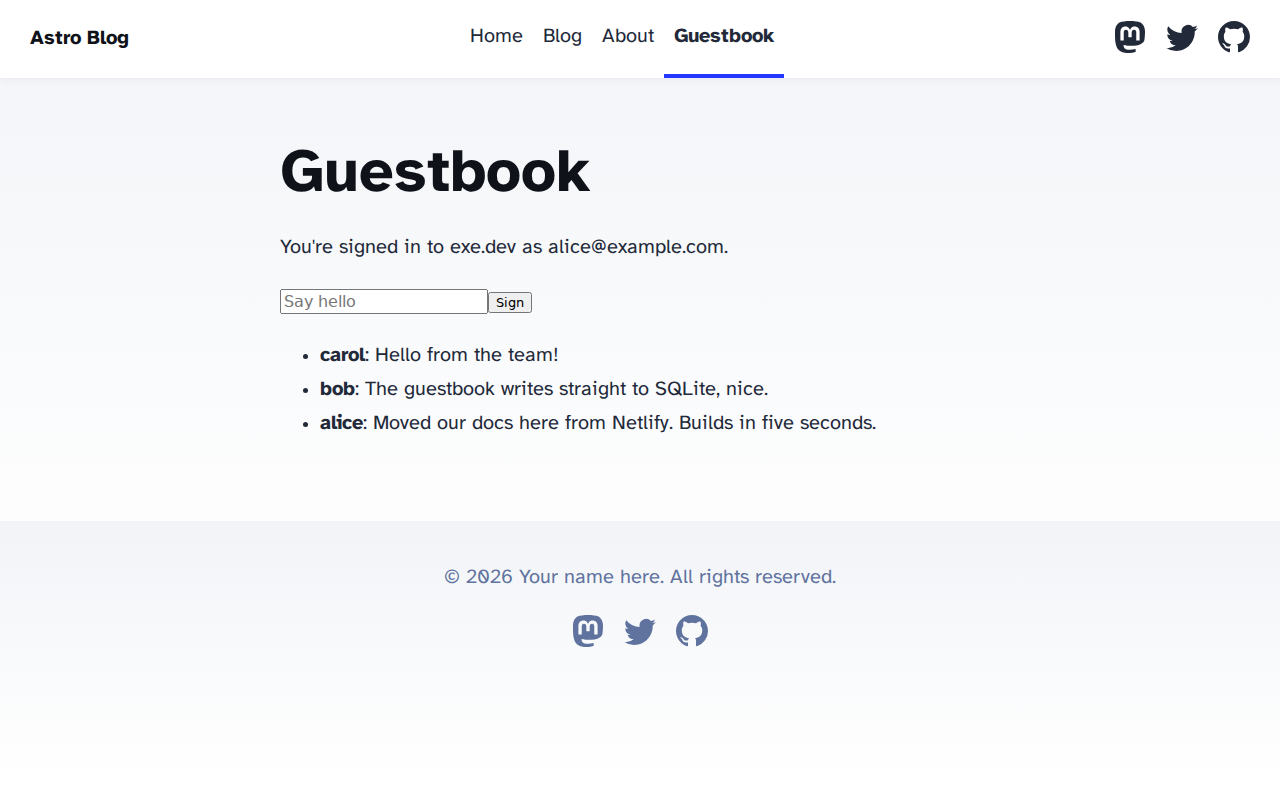
all prerendered when the site was built. Open **Guestbook** and sign it.
That page is rendered on each request by the Node.js server: it greets
you by your exe.dev email, and your message goes through an Astro Action
into SQLite in `~/data/app.db`, where it's still there after a redeploy or
a reboot.

<figure>
<img src="https://exe-staging.dev/deploy/astro/guestbook.png" alt="The Astro blog starter's Guestbook page on an exe.dev VM, greeting the signed-in exe.dev user and listing signed messages" width="1280" height="800" loading="lazy">
<figcaption>The guestbook knows who you are from exe.dev's sign-in; the blog pages around it are static.</figcaption>
</figure>

## Deploy with git push

Your VM holds a git repository, `~/app.git`, and deploys whatever you push
to its `main` branch. Set it up once **on your computer**.

If Shelley started a new site, clone it from the VM:

```bash
git clone -o exe my-astro.exe.xyz:app.git my-astro
cd my-astro
npm install
```

If you brought a GitHub repository, add the VM as a second remote in your
usual checkout. GitHub stays your source of truth; `exe` is where you
deploy:

```bash
git remote add exe my-astro.exe.xyz:app.git
```

Then change something (write a post in `src/content/blog/`, say), commit,
and push:

```bash
git push exe main
```

Use your default branch's name if it isn't `main`. The build streams back
into your terminal and ends with a line like `==> Deployed abc1234
(server, app.service): HTTP 200 at http://localhost:8000/api/messages.json`.
If `ssh` can't find the VM that way, use `vm+my-astro@vm.exe.xyz:app.git`
as the remote's address ([why](/docs/faq/ssh-destination)).

Each push builds a new release next to the running one: a clean copy of
the commit, `npm ci` (or pnpm, Yarn, or Bun, matching your lockfile), and
`astro build`. Only then does `~/app` switch to it. If the build fails, or
the new version doesn't answer, the hook puts the old version back and
git rejects the push: `! [remote rejected] main -> main (pre-receive hook
declined)`. The VM's `main` stays at the commit that's running.

To roll back, push an older commit: `git push -f exe <good-sha>:main`.
To work on your computer, `npm run dev` serves the site at
`http://localhost:4321/` with hot reload.

## Static or server-rendered

Astro prerenders every page to HTML at build time unless you tell it
not to, so what the VM runs depends on what the build produced:

- **A static build** (no adapter in `astro.config.mjs`) is a folder of
  files, `dist/`. Caddy serves it on port 8000, compressed, with your
  `404.html` for missing pages and year-long cache headers for the
  fingerprinted files in `/_astro/`. Nothing of yours runs on a
  request, and a release is just `dist/`, about a megabyte for the
  starter.
- **A server build** (with `@astrojs/node`) writes the prerendered pages
  to `dist/client/` and a Node.js server to `dist/server/entry.mjs`.
  `app.service` runs it on port 8000. It serves the prerendered pages
  and assets itself, renders the pages that opt out of prerendering on
  each request, and answers Actions and API endpoints.

The deploy hook looks for `dist/server/entry.mjs` and starts Caddy or
`app.service` to match, stopping the other, so you can switch either way
with a push. To add a server to a static site, **on your computer**:

```bash
npx astro add node --yes
```

That installs `@astrojs/node` and sets `adapter: node({ mode: 'standalone' })`.
Nothing changes yet: every page is still prerendered. Opt a page out
with one line in its frontmatter, and push:

```astro
---
export const prerender = false; // rendered on each request
---
```

Or set `output: 'server'` to render every page on request and opt
single pages back in with `export const prerender = true`. Then read the
next section, which applies to every server build.

## Behind the exe.dev proxy

exe.dev's [HTTPS proxy](/docs/proxy) ends TLS and passes requests for
`https://my-astro.exe.xyz/` to port 8000 on the VM, with the visitor's
details in `X-Forwarded-Proto`, `X-Forwarded-Host`, and `X-Forwarded-For`.
The new site's `astro.config.mjs` has three lines for it:

```js
site: 'https://my-astro.exe.xyz',
security: { allowedDomains: [{ hostname: 'my-astro.exe.xyz', protocol: 'https' }] },
server: { allowedHosts: ['my-astro.exe.xyz'] },
```

- **`site`** is the public address. Astro uses it for canonical links,
  the sitemap, and the RSS feed, static or not. The blog starter ships
  with `https://example.com`; change it to your address or your domain.
- **`security.allowedDomains`** tells a server build to trust
  `X-Forwarded-Host` and `X-Forwarded-Proto` for that host. Without it,
  `Astro.url` says `http://localhost:8000/...`, so absolute links and
  redirects built from it point nowhere, `Astro.clientAddress` is
  `127.0.0.1` for everyone, and a form posted by a client that sends
  `Origin` without `Sec-Fetch-Site` fails Astro's cross-site check with
  `403 Cross-site POST form submissions are forbidden`. With it, `Astro.url`
  is `https://my-astro.exe.xyz/...` and `clientAddress` is the visitor's.
  Add your own domain here when you add one.
- **`server.allowedHosts`** is for `astro dev` only; see
  [Edit with Shelley](#edit-with-shelley).

The Node.js server listens on `127.0.0.1:8000` (`HOST` and `PORT` in
`app.service`). Put the same three lines in a site you bring, with your
VM's name, before you add the adapter.

## Let exe.dev handle sign-in

For visitors signed in to exe.dev, the proxy adds `X-ExeDev-Email` and
`X-ExeDev-UserID` headers to each request ([login with exe](/docs/login-with-exe)),
and removes any a visitor sends. On a private site, that's everyone who
gets in. On a public one, visitors have no header until they sign in at
`https://my-astro.exe.xyz/__exe.dev/login?redirect=/`. Read the header in
any page rendered on request, or in an endpoint, Action, or middleware:

```astro
---
export const prerender = false;
const email = Astro.request.headers.get('x-exedev-email'); // null if signed out
---
```

In a prerendered page there's no request, so there's no header: the page
was built before anyone visited. The guestbook signs messages with the
name before the `@`, and as "a visitor" for anyone signed out. To keep
some pages for people who are signed in, send everyone else to the login
page from `src/middleware.ts`:

```ts
import { defineMiddleware } from 'astro:middleware';

// /admin is only for people signed in to exe.dev.
export const onRequest = defineMiddleware((context, next) => {
  if (!context.url.pathname.startsWith('/admin')) return next();
  if (context.request.headers.get('x-exedev-email')) return next();
  return context.redirect('/__exe.dev/login?redirect=' + encodeURIComponent(context.url.pathname));
});
```

The `/admin` pages must be rendered on request (`prerender = false`) for
this to run. Who may use them is then up to you: compare the email with
a list in `~/app.env`, say.

## Actions, endpoints, and SQLite

The new site keeps its data in SQLite through `node:sqlite`, which is
built into Node.js, so there's nothing to compile. Three small files do
the work:

- `src/lib/db.ts` opens `~/data/app.db` (`DATABASE_PATH` in `~/app.env`)
  and creates the `messages` table if it isn't there.
- `src/actions/index.ts` defines the `sign` Action. The form on
  `src/pages/guestbook.astro` posts to it without any client-side
  JavaScript; Astro validates the input with Zod and runs the handler
  on the server.
- `src/pages/api/messages.json.ts` is an API endpoint: `GET
  /api/messages.json` returns the newest messages as JSON.

When your schema outgrows `CREATE TABLE IF NOT EXISTS`, add a
`db:migrate` script to `package.json`. The deploy hook runs it after a
backup and before the switch, the convention the [Node.js](/deploy/nodejs#your-database)
recipe explains, or set `MIGRATE_COMMAND='npx drizzle-kit migrate'` in
`~/app.env`. For PostgreSQL, set `DATABASE_URL` in `~/app.env` and see
[PostgreSQL](/deploy/postgres#run-it-next-to-your-app); for more on
SQLite itself, [SQLite](/deploy/sqlite). Put uploads and anything else
your server writes under `~/data` too, so the backup picks them up.

**Calling your API from a script.** The site is private, so a script
gets `401` until it brings a token. Make one that opens this VM's site
and nothing else ([HTTPS tokens for VMs](/docs/https-tokens-for-vms)).
**On your computer**:

```bash
ssh exe.dev ssh-key generate-api-key --vm=my-astro --label=guestbook-api --exp=90d
```

Then send it in the `X-Exedev-Authorization` header, which the proxy
checks and removes before your server sees the request:

```bash
curl -H "X-Exedev-Authorization: Bearer $TOKEN" https://my-astro.exe.xyz/api/messages.json
```

Tools that only do basic auth can send the token as the password, with
any user name. Requests made with the token arrive with your
`X-ExeDev-Email`.

## Content and a CMS

The blog's posts are a [content collection](https://docs.astro.build/en/guides/content-collections/):
Markdown and MDX files in `src/content/blog/`, loaded and type-checked by
the schema in `src/content.config.ts`. Write a post, push, and the build
turns it into a page. That's the simplest CMS there is, and Shelley is
good at it: "Write a post about our launch, with the screenshot in
`src/assets`."

When editors need a web interface, a headless CMS on its own VM (or
this one) can feed the same collections. Astro has two ways to read it:

- **At build time**, with a loader in `src/content.config.ts` that
  fetches entries from the CMS's API. Pages stay static, so the site
  must be rebuilt when content changes: run the deploy again, with
  `ssh my-astro.exe.xyz app.git/hooks/pre-receive HEAD` from your
  computer or a CI job, or `~/app.git/hooks/pre-receive HEAD` from a
  systemd timer on the VM.
- **On each request**, by fetching from the CMS in a page with
  `prerender = false`. Edits show up immediately, at the cost of a
  request to the CMS per page view.

If the CMS runs on another exe.dev VM, keep its API private and give the
build a VM token for it, as in the script example above, in `~/app.env`.

## Deploy from GitHub

If GitHub is where you push, the VM can deploy from there instead: a
timer fetches your branch every minute and deploys new commits through
the same hook, with the same rollback. Nothing has to reach the private
VM from outside. Set it up **on the VM**, after you've deployed once from
a GitHub repository ("Bring your GitHub repository" in
[Set up by hand](#create-the-vm)):

```bash
cat > ~/bin/app-pull <<'EOF'
#!/usr/bin/env bash
# Deploys the newest commit of the deploy branch from the origin remote
# (GitHub), unless it's already running or already failed. Run every minute
# by app-pull.timer; run it by hand to deploy right away.
set -euo pipefail
export GIT_DIR=$HOME/app.git
branch=$(git symbolic-ref --short HEAD)
git fetch -q origin "+refs/heads/$branch:refs/remotes/origin/$branch"
new=$(git rev-parse "refs/remotes/origin/$branch")
[ "$new" != "$(git rev-parse -q --verify "refs/heads/$branch" || true)" ] || exit 0
[ "$new" != "$(cat "$HOME/.deploy-failed" 2>/dev/null)" ] || exit 0
if "$HOME/app.git/hooks/pre-receive" "$new"; then
  git update-ref "refs/heads/$branch" "$new"
  rm -f "$HOME/.deploy-failed"
else
  echo "$new" > "$HOME/.deploy-failed"
  exit 1
fi
EOF
chmod +x ~/bin/app-pull
sudo tee /etc/systemd/system/app-pull.service >/dev/null <<'EOF'
[Unit]
Description=Deploy new commits from GitHub

[Service]
Type=oneshot
User=exedev
ExecStart=/home/exedev/bin/app-pull
EOF
sudo tee /etc/systemd/system/app-pull.timer >/dev/null <<'EOF'
[Unit]
Description=Check GitHub for new commits every minute

[Timer]
OnBootSec=1min
OnUnitActiveSec=1min

[Install]
WantedBy=timers.target
EOF
sudo systemctl daemon-reload
sudo systemctl enable --now app-pull.timer
```

Push to GitHub, and within a minute `journalctl -u app-pull -f` shows the
build and `==> Deployed`. A commit that fails to deploy is tried once;
the next commit tries again. For a private repository, the fetch goes
through exe.dev's [GitHub integration](/docs/integrations-github), so no
GitHub token is stored on the VM. To deploy at once rather than within a
minute, run `ssh my-astro.exe.xyz bin/app-pull` from your computer, or
from a CI job with a [VM-scoped SSH key](/deploy/spring-boot#build-on-your-computer-or-in-ci).

Pick one way to deploy: with the timer on, push to GitHub, not to `exe`,
or the next fetch puts GitHub's commit back. To stop it,
`sudo systemctl disable --now app-pull.timer`.

## Edit with Shelley

Shelley, at `https://my-astro.shelley.exe.xyz/`, works on this VM with
you. Ask it to change the site and to show you the change before it
ships: it clones `~/app.git` into a working copy, runs `astro dev` there,
and you watch the page update at `https://my-astro.exe.xyz:4321/` as it
edits. When you like it, it commits and pushes to `~/app.git`, which
deploys. Try: "Add a dark mode toggle to the header", "Write a post
from these notes", "Add a contact form that saves to SQLite and emails
me" ([email](/docs/send-email)), or "The last deploy failed; tell me why".

To run the dev server yourself, **on the VM**:

```bash
git clone ~/app.git ~/src && cd ~/src && npm install
npx astro dev
```

Port 4321 is always private: only you and the people you share the VM
with can open it. The dev server only answers hostnames in
`server.allowedHosts`; without your VM's name there, the page says
`Blocked request. This host ("my-astro.exe.xyz") is not allowed.`
Astro 7's `npx astro dev --background` starts it as a background
process (`astro dev status`, `astro dev logs`, `astro dev stop`), which
is what agents use. Since a working copy's pushes deploy, have it set
`DATABASE_PATH` to a scratch file (`DATABASE_PATH=/tmp/dev.db npx astro dev`)
so testing doesn't write to the live guestbook.

For a staging copy of the whole site, make a second VM from this recipe
([dev, test, and prod](/deploy/dev-test-prod)).

## Make it public, add a domain

The site is private: only people you've [shared it with](/docs/sharing)
can open it, after signing in to exe.dev. To let your team in,
`ssh exe.dev share add my-astro teammate@example.com`, or
`ssh exe.dev share add-link my-astro` for a link anyone can use. When
you're ready for the world, **on your computer**:

```bash
ssh exe.dev share set-public my-astro
```

`ssh exe.dev share set-private my-astro` closes it again. To serve it on
your own domain, point a CNAME at `my-astro.exe.xyz` and run
`ssh exe.dev domain add my-astro www.example.com`; exe.dev issues the
certificate ([custom domains](/docs/cnames)). Then set `site` to the new
address, add it to `security.allowedDomains`, and push, so canonical
links and the sitemap use it.

## Coming from Netlify, Vercel, or Cloudflare

A static Astro site moves as it is: the hook runs your `build` script
and Caddy serves `dist/`. For a site with server-rendered pages:

- **The adapter.** Replace `@astrojs/netlify`, `@astrojs/vercel`, or
  `@astrojs/cloudflare` with `@astrojs/node`: `npm uninstall` the old
  one, then `npx astro add node --yes`, and remove the old import and
  options from `astro.config.mjs`.
- **Environment variables.** Copy them from the platform's dashboard
  into `~/app.env`. `astro:env` and `process.env` both read them on the
  server; build-time values (`PUBLIC_*`) need a redeploy to change.
- **Platform storage.** Netlify Blobs, Vercel KV, and Cloudflare KV,
  D1, and R2 don't exist here: use files and SQLite in `~/data`, or keep
  calling the hosted service over its API.
- **Config files.** Move `_redirects`, `netlify.toml` redirects, or
  `vercel.json` rewrites into Astro's `redirects` setting. Scheduled
  functions become [systemd timers](/deploy/nodejs#cron-jobs).
- **What you no longer get.** A global CDN and preview deployments: the
  site runs on one VM in one region. For previews, run `astro dev` (see
  above) or a second VM.

## Keep your data

Every night, `~/bin/app-backup` saves `~/data` (SQLite through its
`.backup` command, so the copy is consistent), `~/app.env`, and the whole
`~/app.git` repository into `~/backups/app-nightly-<time>.tar.gz`. Each
deploy that runs migrations saves an `app-deploy-` backup first. It keeps
the 14 newest of each kind. A backup on a lost VM won't help much, so copy
them off now and then. **On your computer**:

```bash
scp -r my-astro.exe.xyz:backups ./my-astro-backups
```

The files hold your secrets; keep them private. A static site has no
data of its own: its content is in the repository, which the backup
includes.

## The nuts and bolts

Happy with what Deploy set up? You can stop here. These are the setup
steps Shelley follows, which you can run by hand, and the commands for
later.

<details id="create-the-vm" data-manual-setup class="dp-details">
<summary>Set up by hand</summary>

### Create the VM

On your computer (pick another name if `my-astro` is taken):

```bash
ssh exe.dev new --name=my-astro
ssh my-astro.exe.xyz
```

Everything else runs **on the VM**, as `exedev`.

### Install Node.js and Caddy

Install Node.js 26, the current LTS release, from NodeSource's apt
repository, so systemd, the git hook, and your shell all use the same
`node` in `/usr/bin`. Astro 7 needs Node.js 22.23 or later.

```bash
curl -fsSL https://deb.nodesource.com/setup_26.x | sudo -E bash -
sudo apt-get install -y nodejs sqlite3 rsync
sudo npm install -g corepack && sudo corepack enable
node --version
```

Expect `v26.` and a patch version. Corepack provides `pnpm` and `yarn`
for repositories that use them. Then Caddy, from its own apt repository
(Ubuntu's package is years old):

```bash
curl -1sLf 'https://dl.cloudsmith.io/public/caddy/stable/gpg.key' |
  sudo gpg --batch --yes --dearmor -o /usr/share/keyrings/caddy-stable-archive-keyring.gpg
curl -1sLf 'https://dl.cloudsmith.io/public/caddy/stable/debian.deb.txt' |
  sudo tee /etc/apt/sources.list.d/caddy-stable.list >/dev/null
sudo chmod o+r /usr/share/keyrings/caddy-stable-archive-keyring.gpg /etc/apt/sources.list.d/caddy-stable.list
sudo apt-get update && sudo apt-get install -y caddy
caddy version
```

Expect `v2.` and a version.

### Settings, data, and the services

Create the data and release directories and a private settings file.
This leaves an existing `~/app.env` alone:

```bash
mkdir -p ~/data ~/releases ~/backups ~/bin
if [ ! -e ~/app.env ]; then
  install -m 600 /dev/null ~/app.env
  cat >> ~/app.env <<'EOF'
# Settings and secrets for the site: KEY=value, one per line. Quote values
# with spaces or $ in 'single quotes'. Read by the build and by app.service.
# After changing it, redeploy: ~/app.git/hooks/pre-receive HEAD
EOF
fi
stat -c '%a %n' ~/app.env
```

Expect `600 /home/exedev/app.env`. Next, Caddy, for static builds. It
runs as the `caddy` user, which needs to read the build in your home
directory, so it joins the `exedev` group (`~/app.env` stays readable by
`exedev` only). It serves port 8000, where exe.dev's proxy sends
`https://my-astro.exe.xyz/`:

```bash
sudo usermod -aG exedev caddy
sudo tee /etc/caddy/Caddyfile >/dev/null <<'EOF'
# A static Astro site: Caddy serves ~/app/dist on port 8000, where exe.dev's
# proxy sends https://<vm>.exe.xyz/. A site with a server uses app.service instead.
:8000 {
	root * /home/exedev/app/dist
	encode zstd gzip
	header /_astro/* Cache-Control "public, max-age=31536000, immutable"
	file_server
	handle_errors 404 {
		rewrite * /404.html
		file_server
	}
}
EOF
caddy validate --config /etc/caddy/Caddyfile --adapter caddyfile 2>&1 | tail -1
sudo systemctl disable --now caddy
```

Expect `Valid configuration`. Caddy stays off until the first deploy
starts whichever server the build needs. The service for server builds
runs Astro's standalone server, on the same port:

```bash
sudo tee /etc/systemd/system/app.service >/dev/null <<'EOF'
[Unit]
Description=Astro server (node dist/server/entry.mjs in ~/app)
After=network-online.target
Wants=network-online.target

[Service]
User=exedev
WorkingDirectory=/home/exedev/app
Environment=NODE_ENV=production HOST=127.0.0.1 PORT=8000
# Lines in app.env override the ones above.
EnvironmentFile=/home/exedev/app.env
ExecStart=/usr/bin/node dist/server/entry.mjs
Restart=always
RestartSec=3

[Install]
WantedBy=multi-user.target
EOF
sudo systemctl daemon-reload
```

### Back up every night

`~/bin/app-backup` saves everything that isn't in a release: `~/data`
(each SQLite database through `.backup`, which is safe while the server
writes, and then checked), `~/app.env`, and the repository in
`~/app.git` as a git bundle. A new site's only copy lives there until you
clone it. It keeps the 14 newest backups of each kind: `nightly`,
`deploy` (the hook takes one before running migrations), and `manual`.

```bash
mkdir -p ~/bin
cat > ~/bin/app-backup <<'EOF'
#!/usr/bin/env bash
# Back up ~/data, ~/app.env and ~/app.git to ~/backups/app-<kind>-<time>.tar.gz.
# SQLite databases are copied with .backup, safe while the app runs, and
# checked. Keeps the 14 newest backups of each kind.
# Usage: app-backup [nightly|deploy|manual]
set -euo pipefail
umask 077
kind=${1:-manual}
work=$(mktemp -d)
trap 'rm -rf "$work"' EXIT
mkdir -p "$HOME/backups" "$work/data"
cd "$HOME/data"
rsync -a --exclude='*.db' --exclude='*.db-*' --exclude='*.sqlite*' ./ "$work/data/"
find . -type f \( -name '*.db' -o -name '*.sqlite' -o -name '*.sqlite3' \) | while read -r db; do
  mkdir -p "$work/data/$(dirname "$db")"
  sqlite3 "$db" ".backup '$work/data/$db'"
  [ "$(sqlite3 "$work/data/$db" 'PRAGMA quick_check')" = ok ]
done
cp "$HOME/app.env" "$work/"
if git -C "$HOME/app.git" rev-parse -q --verify HEAD >/dev/null; then
  git -C "$HOME/app.git" bundle create -q "$work/app.bundle" --all
fi
out="$HOME/backups/app-$kind-$(date -u +%Y%m%d-%H%M%S).tar.gz"
tar -czf "$out.part" -C "$work" .
mv "$out.part" "$out"
ls -1t "$HOME/backups/app-$kind-"*.tar.gz | tail -n +15 | xargs -r rm --
echo "$out"
EOF
chmod +x ~/bin/app-backup

sudo tee /etc/systemd/system/app-backup.service >/dev/null <<'EOF'
[Unit]
Description=Back up the site's data, settings and repository to ~/backups

[Service]
Type=oneshot
User=exedev
ExecStart=/home/exedev/bin/app-backup nightly
EOF
sudo tee /etc/systemd/system/app-backup.timer >/dev/null <<'EOF'
[Unit]
Description=Back up the site every night

[Timer]
OnCalendar=*-*-* 03:00:00 UTC
RandomizedDelaySec=30m
Persistent=true

[Install]
WantedBy=timers.target
EOF
sudo systemctl daemon-reload
sudo systemctl enable --now app-backup.timer
systemctl list-timers app-backup.timer
```

### Get the code

The VM deploys from a bare git repository, `~/app.git`. Create it one of
two ways.

**Start a new site** (`REPO=new`): an empty repository whose branch is
`main`.

```bash
git init --bare -b main ~/app.git
```

**Bring your GitHub repository**: a copy of it. A public repository
clones directly; replace `OWNER/NAME`:

```bash
git clone --bare https://github.com/OWNER/NAME.git ~/app.git
git -C ~/app.git symbolic-ref --short HEAD
```

The last line prints the branch that will deploy: your default branch.

For a **private** repository, connect GitHub to exe.dev once (on the
[Integrations page](https://exe.dev/integrations)) and attach the
repository to this VM. On your computer:

```bash
ssh exe.dev integrations add github --name astro-repo --repository OWNER/NAME --readonly --attach vm:my-astro
```

Then clone through the integration on the VM. No token lands on the disk
([GitHub integration](/docs/integrations-github)):

```bash
git clone --bare https://github.int.exe.xyz/OWNER/NAME.git ~/app.git
```

If that clone fails with "not found" or a 403, the integration isn't
attached to this VM yet.

### Add the deploy hook

Git runs `hooks/pre-receive` before it accepts a push. This one builds
the pushed commit in its own directory under `~/releases`, switches
`~/app` to it, starts Caddy (static build) or `app.service` (server
build), and checks that the site answers. If any step fails, it
switches back and rejects the push, so `main` on the VM is always what's
running.

```bash
cat > ~/app.git/hooks/pre-receive <<'EOF'
#!/usr/bin/env bash
# Builds and deploys the Astro site. Git runs this before accepting a push to
# ~/app.git; if the deploy fails, the push is rejected and the running
# version stays. To redeploy main by hand (after editing ~/app.env, say):
#   ~/app.git/hooks/pre-receive HEAD
set -euo pipefail
export GIT_DIR=$HOME/app.git
branch=$(git symbolic-ref --short HEAD)  # the branch that deploys
rev=
if [ $# -gt 0 ]; then
  rev=$(git rev-parse --verify "$1^{commit}")
else
  while read -r _ new ref; do
    [ "$ref" = "refs/heads/$branch" ] || continue
    case $new in
      *[!0]*) rev=$new ;;
      *) echo "==> Refusing to delete $branch: it's what deploys."; exit 1 ;;
    esac
  done
  [ -n "$rev" ] || exit 0  # other branches are kept, not deployed
fi

exec 9>"$HOME/.deploy.lock" && flock 9  # one deploy at a time
release=$HOME/releases/$(date -u +%Y%m%d-%H%M%S)-${rev:0:7}
previous=$(readlink "$HOME/app" || true)

activate() {  # point ~/app at a release and start what serves it on port 8000
  ln -sfn "$1" "$HOME/app.new" && mv -T "$HOME/app.new" "$HOME/app"
  if [ -f "$1/dist/server/entry.mjs" ]; then  # @astrojs/node: Node.js serves it
    sudo systemctl disable -q --now caddy
    sudo systemctl enable -q app
    sudo systemctl restart app
  else  # static: Caddy serves dist/
    sudo systemctl disable -q --now app
    sudo systemctl enable -q --now caddy
  fi
}
fail() {  # put the previous release back and reject the push
  trap - ERR
  echo "==> Deploy FAILED${1:+: $1}. Still running: ${previous:-nothing}"
  if [ -n "$previous" ] && [ "$(readlink "$HOME/app")" != "$previous" ]; then
    activate "$previous"
  fi
  rm -rf "$release"
  exit 1
}
trap fail ERR

echo "==> Building ${rev:0:7} in $release"
mkdir -p "$release"
git archive "$rev" | tar -x -C "$release"
unset GIT_DIR GIT_OBJECT_DIRECTORY GIT_ALTERNATE_OBJECT_DIRECTORIES GIT_QUARANTINE_PATH
cd "$release"
set -a; . "$HOME/app.env"; set +a
unset NODE_ENV  # install devDependencies too, for the build; app.service sets it
export COREPACK_ENABLE_DOWNLOAD_PROMPT=0
if [ -f bun.lock ] || [ -f bun.lockb ]; then bun install --frozen-lockfile
elif [ -f pnpm-lock.yaml ]; then pnpm install --frozen-lockfile
elif [ -f yarn.lock ] && [ -f .yarnrc.yml ]; then yarn install --immutable
elif [ -f yarn.lock ]; then yarn install --frozen-lockfile
elif [ -f package-lock.json ]; then npm ci
else npm install
fi
npm run build
[ -d dist ] || fail "the build wrote no dist/ directory"
if [ -f dist/server/entry.mjs ]; then
  mode="server, app.service"
  migrate=${MIGRATE_COMMAND:-}
  if [ -z "$migrate" ] && node -e 'process.exit(require("./package.json").scripts?.["db:migrate"] ? 0 : 1)'; then
    migrate="npm run db:migrate"
  fi
  if [ -n "$migrate" ]; then
    "$HOME/bin/app-backup" deploy >/dev/null  # back up before migrating
    bash -c "$migrate"
    echo
  fi
else
  mode="static, Caddy"
  rm -rf node_modules  # a static site needs only dist/
fi

echo "==> Starting the new version ($mode)"
activate "$release"
check=${DEPLOY_CHECK_PATH:-/}  # a page that exercises your server code
for _ in $(seq 60); do
  code=$(curl -s -o /dev/null -m 10 -w '%{http_code}' "http://localhost:8000$check" || true)
  case $code in 000|5??) sleep 1 ;; *) break ;; esac
done
case $code in
  000|5??) fail "the new version answers HTTP $code at $check (journalctl -u app -u caddy -n 50)" ;;
esac
trap - ERR
ls -1d "$HOME"/releases/*/ | head -n -3 | xargs -r rm -rf  # keep 3
echo "==> Deployed ${rev:0:7} ($mode): HTTP $code at http://localhost:8000$check"
EOF
chmod +x ~/app.git/hooks/pre-receive
```

The hook installs with your lockfile's package manager and runs the
`build` script. A static release keeps only `dist/`; a server release
keeps its `node_modules` too. After the switch it requests
`DEPLOY_CHECK_PATH` (from `~/app.env`, default `/`) and counts any answer
below 500 as up. Point it at a page rendered on request, so a server
that starts but fails on real requests is rolled back.

### Start a new site

Skip to [Deploy and check](#deploy-and-check) if you brought a
repository. Otherwise, create the site from Astro 7.4.13's blog template
with the Node adapter:

```bash
rm -rf /tmp/new-app && mkdir -p /tmp/new-app && cd /tmp/new-app
npm create --yes astro@5 -- "$(hostname)" --template blog --ref astro@7.4.13 --add node \
  --install --no-git --no-ai --skip-houston --yes
cd "$(hostname)" && npx astro --version
```

Expect `astro  v7.4.13`. `create-astro` 5 is Astro's project creator;
`--ref` pins the template, and `package.json` then keeps Astro on 7.x.
Point the site at its public address, trust exe.dev's proxy for it, keep
sessions in `~/data`, and add a Guestbook link to the header:

```bash
cd "/tmp/new-app/$(hostname)"
host="$(hostname).exe.xyz"
sed -i "s|import { defineConfig, fontProviders } from 'astro/config';|import { defineConfig, fontProviders, sessionDrivers } from 'astro/config';|" astro.config.mjs
sed -i "s|site: 'https://example.com',|site: 'https://$host',\n  // exe.dev's proxy sends the public host and https in X-Forwarded-*: trust them for this host.\n  security: { allowedDomains: [{ hostname: '$host', protocol: 'https' }] },\n  // Let \`astro dev\` answer at https://$host:4321/ too.\n  server: { allowedHosts: ['$host'] },\n  // Keep sessions on the data disk, not inside a release.\n  session: { driver: sessionDrivers.fsLite({ base: '/home/exedev/data/sessions' }) },|" astro.config.mjs
sed -i 's|<HeaderLink href="/about">About</HeaderLink>|&\n\t\t\t<HeaderLink href="/guestbook">Guestbook</HeaderLink>|' src/components/Header.astro
printf '*.db\n*.db-*\n' >> .gitignore
sed -n '/^export default/,/session:/p' astro.config.mjs
```

Expect the four settings under `export default defineConfig({`, with the
VM's name in them. Now the guestbook: the database, the Action, the page,
and the JSON endpoint.

```bash
cd "/tmp/new-app/$(hostname)"
mkdir -p src/lib src/actions src/pages/api
cat > src/lib/db.ts <<'EOF'
import { DatabaseSync } from 'node:sqlite';

// On the VM, ~/app.env sets DATABASE_PATH=/home/exedev/data/app.db
export const db = new DatabaseSync(process.env.DATABASE_PATH ?? 'app.db');
db.exec(`
  PRAGMA journal_mode = WAL;
  PRAGMA busy_timeout = 5000;
  CREATE TABLE IF NOT EXISTS messages (
    id INTEGER PRIMARY KEY,
    author TEXT NOT NULL,
    body TEXT NOT NULL,
    created_at TEXT NOT NULL DEFAULT (datetime('now'))
  );
`);

export type Message = { author: string; body: string; created_at: string };

export function latestMessages(): Message[] {
  return db
    .prepare('SELECT author, body, created_at FROM messages ORDER BY id DESC LIMIT 50')
    .all() as Message[];
}
EOF
cat > src/actions/index.ts <<'EOF'
import { defineAction } from 'astro:actions';
import { z } from 'astro/zod';
import { db } from '../lib/db';

export const server = {
  sign: defineAction({
    accept: 'form',
    input: z.object({ body: z.string().trim().min(1).max(280) }),
    handler: async ({ body }, context) => {
      // exe.dev's proxy says who is signed in. Visitors to a public site
      // who haven't signed in have no header.
      const email = context.request.headers.get('x-exedev-email');
      const author = email ? email.split('@')[0] : 'a visitor';
      db.prepare('INSERT INTO messages (author, body) VALUES (?, ?)').run(author, body);
      return { author };
    },
  }),
};
EOF
cat > src/pages/guestbook.astro <<'EOF'
---
import { actions } from 'astro:actions';
import BaseHead from '../components/BaseHead.astro';
import Footer from '../components/Footer.astro';
import Header from '../components/Header.astro';
import { latestMessages } from '../lib/db';

export const prerender = false; // rendered on every request by the Node.js server

const result = Astro.getActionResult(actions.sign);
if (result && !result.error) return Astro.redirect('/guestbook');

const email = Astro.request.headers.get('x-exedev-email');
const messages = latestMessages();
---

<!doctype html>
<html lang="en">
	<head>
		<BaseHead title="Guestbook" description="Leave a message." />
	</head>
	<body>
		<Header />
		<main>
			<h1>Guestbook</h1>
			<p>{email ? `You're signed in to exe.dev as ${email}.` : 'Not signed in: you sign as "a visitor".'}</p>
			<form method="POST" action={actions.sign}>
				<input name="body" required maxlength="280" placeholder="Say hello" />
				<button>Sign</button>
			</form>
			{result?.error && <p>That didn't work: {result.error.message}</p>}
			{messages.length === 0 && <p>No messages yet. Be the first.</p>}
			<ul>
				{messages.map((m) => <li><b>{m.author}</b>: {m.body}</li>)}
			</ul>
		</main>
		<Footer />
	</body>
</html>
EOF
cat > src/pages/api/messages.json.ts <<'EOF'
import type { APIRoute } from 'astro';
import { latestMessages } from '../../lib/db';

export const prerender = false;

// GET /api/messages.json: the guestbook as JSON.
export const GET: APIRoute = () => Response.json(latestMessages());
EOF
```

Tell the server where the database lives and which page proves a
deploy works, then commit and push to the VM's repository. The push
deploys:

```bash
cd "/tmp/new-app/$(hostname)"
printf 'DATABASE_PATH=/home/exedev/data/app.db\nDEPLOY_CHECK_PATH=/api/messages.json\n' >> ~/app.env
git init -q -b main
git add -A
git -c user.name="$(hostname)" -c user.email="exedev@$(hostname).exe.xyz" commit -qm "Astro blog with a guestbook on SQLite"
git push ~/app.git HEAD:main
```

The output ends with `==> Deployed` and `(server, app.service)`. The
code now lives in `~/app.git` (the owner clones it from there), so remove
the scratch copy:

```bash
cd ~ && rm -rf /tmp/new-app
```

### Deploy and check

If you brought a repository, look at its `astro.config.*` first:

- No adapter: it deploys as a static site. Set `site` to
  `https://` plus the VM's name and `.exe.xyz` (or the domain it will
  have) if it's still a placeholder; that's a change to the owner's
  code, so tell them rather than committing it.
- `@astrojs/node`: it deploys as a server. It needs the
  `security.allowedDomains` line from
  [Behind the exe.dev proxy](#behind-the-exedev-proxy) to see its public
  address; tell the owner.
- Another adapter (Netlify, Vercel, Cloudflare): the build won't produce
  something this VM can run; see
  [Coming from Netlify, Vercel, or Cloudflare](#coming-from-netlify-vercel-or-cloudflare).

Put any settings it needs in `~/app.env` (look for `.env.example` or the
README). Then deploy its default branch:

```bash
~/app.git/hooks/pre-receive HEAD
```

(A new site deployed when you pushed it.) Check, for either kind:

```bash
readlink ~/app
for s in caddy app; do echo "$s: $(systemctl is-enabled $s) $(systemctl is-active $s)"; done
curl -s -o /dev/null -w '%{http_code}\n' http://localhost:8000/
```

Expect the release directory; `caddy: enabled active` and `app: disabled
inactive` for a static site, the other way round for a server; and
`200`. For a new site, sign the guestbook through the port the proxy
uses, as a signed-in visitor would:

```bash
curl -s -o /dev/null -w '%{http_code}\n' -H 'X-ExeDev-Email: setup@example.com' \
  -H 'Origin: http://localhost:8000' --data-urlencode 'body=Hello from setup' \
  'http://localhost:8000/guestbook?_action=sign'
curl -s http://localhost:8000/api/messages.json; echo
sqlite3 ~/data/app.db 'DELETE FROM messages'
```

Expect `302` (the page sends the browser back to `/guestbook`) and
`[{"author":"setup","body":"Hello from setup",...}]`; the last command
removes the test message.

### Check the backup

Take the first backup by hand, then open it in a scratch directory, never
over `~/data`, to check that it holds what a restore needs:

```bash
latest=$(~/bin/app-backup manual)
rm -rf /tmp/restore-check && mkdir /tmp/restore-check
tar -xzf "$latest" -C /tmp/restore-check
ls -A /tmp/restore-check /tmp/restore-check/data
git -C ~/app.git bundle verify /tmp/restore-check/app.bundle
find /tmp/restore-check/data -type f \( -name '*.db' -o -name '*.sqlite' -o -name '*.sqlite3' \) |
  while read -r db; do echo "$db: $(sqlite3 "$db" 'PRAGMA integrity_check')"; done
rm -rf /tmp/restore-check
```

Expect `app.bundle`, `app.env`, and `data`; `The bundle records a complete
history`; and `ok` for each database (a new site has `app.db`; a static
site has none).

Setup is done. Continue with [Open your site](#open-your-site).

</details>

<details id="restore" class="dp-details">
<summary>Restore a backup</summary>

### On the same VM

On the VM, pick the archive (`ls -lt ~/backups`), unpack it, and swap
its `data` in while the server is stopped. The current data is kept aside:

```bash
backup=~/backups/app-nightly-20261118-030512.tar.gz   # the one you want
rm -rf /tmp/restore && mkdir /tmp/restore && tar -xzf "$backup" -C /tmp/restore
sudo systemctl stop app
mv ~/data ~/data.before-restore-$(date +%s)
cp -a /tmp/restore/data ~/data
sudo systemctl start app
```

(For a static site, `app` is off, and there's nothing in `data` to
restore unless you put something there.) Open the site and check your
data. `~/app.env` is in `/tmp/restore` too, if you need an old setting
back. Delete `~/data.before-restore-*` when you're sure.

### On a new VM

Create the VM and follow [Set up by hand](#create-the-vm) up to, but not
including, "Get the code". Copy the archive over from your computer
(`scp app-nightly-20261118-030512.tar.gz my-astro.exe.xyz:`), then on the VM:

```bash
rm -rf /tmp/restore && mkdir /tmp/restore && tar -xzf ~/app-nightly-20261118-030512.tar.gz -C /tmp/restore
git clone --bare /tmp/restore/app.bundle ~/app.git && git -C ~/app.git remote remove origin
install -m 600 /tmp/restore/app.env ~/app.env
rm -rf ~/data && cp -a /tmp/restore/data ~/data
```

Then follow [Add the deploy hook](#add-the-deploy-hook) and deploy with
`~/app.git/hooks/pre-receive HEAD`. A site made on the old VM still has
the old VM's name in `site`, `security.allowedDomains`, and
`server.allowedHosts`: change them (or add your domain) and push. On
your computer, point the `exe` remote at the new VM:
`git remote set-url exe <new-vm>.exe.xyz:app.git`.

</details>

<details id="update" class="dp-details">
<summary>Update Astro, Node.js, and Caddy</summary>

**Astro** is a dependency of your site, so update it on your computer
and deploy. Astro's upgrade tool updates Astro and its official
integrations, including `@astrojs/node`, together:

```bash
npx @astrojs/upgrade
npm run build
git commit -am "Update Astro" && git push exe main
```

For a new major version, read Astro's
[upgrade guides](https://docs.astro.build/en/upgrade-astro/) first.

**Node.js and Caddy** patch releases arrive with the system's updates.
On the VM:

```bash
sudo apt-get update && sudo apt-get install -y nodejs caddy
sudo systemctl try-restart app caddy
node --version && caddy version
```

When a newer Node.js LTS major comes out, take a backup, switch the apt
repository (`setup_28.x` for Node.js 28, say), and redeploy, so the
release's dependencies are installed with the new Node.js:

```bash
~/bin/app-backup
curl -fsSL https://deb.nodesource.com/setup_28.x | sudo -E bash -
sudo apt-get install -y nodejs
~/app.git/hooks/pre-receive HEAD
```

</details>

<details id="troubleshooting" class="dp-details">
<summary>Something not working?</summary>

On the VM, the logs of whichever server is running:

```bash
journalctl -u app -u caddy -n 100 --no-pager
```

- **`git push` says `Deploy FAILED` and `pre-receive hook declined`.**
  The lines above it are the error, often the same one `npm run build`
  gives on your computer. The running version didn't change; fix it and
  push again.
- **`Error: Cannot find module` during the build or at start.** The
  package manager didn't install everything. Check that your lockfile is
  committed and up to date (`npm install` on your computer, then commit
  `package-lock.json`).
- **The build says your Node.js version isn't supported.** Astro 7
  needs Node.js 22.23 or later; check `node --version` on the VM.
- **The site deployed as static, but you expected a server.** The build
  made no `dist/server/entry.mjs`. Check that `astro.config.mjs` has
  `adapter: node({ mode: 'standalone' })`; Netlify, Vercel, and
  Cloudflare adapters write their output elsewhere.
- **A page says `403 Forbidden` from Caddy.** Caddy can't read your
  home directory: run `sudo usermod -aG exedev caddy` and
  `sudo systemctl restart caddy`.
- **`Cross-site POST form submissions are forbidden`.** `security.allowedDomains`
  is missing your address, or the form posts to a different host; see
  [Behind the exe.dev proxy](#behind-the-exedev-proxy).
- **Links and redirects go to `localhost:8000`.** Same cause: add your
  address to `security.allowedDomains`, and set `site`.
- **`Astro.request.headers.get('x-exedev-email')` is always null.** The
  page is prerendered; add `export const prerender = false`. On a public
  site, the visitor also has to sign in.
- **A new environment variable has no effect.** Redeploy with
  `~/app.git/hooks/pre-receive HEAD`; values read at build time, such as
  `PUBLIC_*` and anything a prerendered page uses, are fixed until the
  next build.
- **`Blocked request. This host is not allowed.`** `astro dev` needs your
  VM's name in `server.allowedHosts`.
- **The site shows exe.dev's error page after a reboot.** Check
  `systemctl status app caddy`: one of them should be `enabled`.
  `readlink ~/app` must point at an existing release.
- **Disk filling up.** `du -sh ~/releases/* ~/backups ~/.npm`; the hook
  keeps three releases, and `npm cache clean --force` empties npm's cache.

</details>

## Frequently asked questions

### Static or SSR, which should I use?

Start static. Astro prerenders every page by default, and a static build served by Caddy is the fastest and simplest thing to run. Add the Node adapter when a page needs something only a server has: the visitor's identity, a form that saves data, an API endpoint, an Action. Even then the other pages stay prerendered; you opt single pages out with `export const prerender = false`. The deploy hook notices which one you built and starts Caddy or Node.js to match.

### Which versions does this install?

A new site is created from the Astro 7.4.13 blog template (Astro 7 came out in June 2026) with `@astrojs/node` 11, on Node.js 26, the current LTS release, from NodeSource's apt repository. Static builds are served by Caddy 2.11 from Caddy's own apt repository. Your `package.json` keeps Astro on major version 7 until you upgrade it.

### Do I need Docker or a Dockerfile?

No. The VM builds your site with Node.js and serves it with Caddy or Node.js directly, under systemd. If you'd rather ship a container, see [Docker Compose](/deploy/docker-compose).

### Does Astro still support self-hosting now that it's part of Cloudflare?

Yes. Cloudflare acquired The Astro Technology Company in January 2026; Astro stays MIT-licensed and, in its team's words, platform-agnostic, and `@astrojs/node` remains one of its official adapters. Everything on this page uses only open-source Astro, Node.js, and Caddy.

### How big a VM does an Astro site need?

The default (2 vCPUs, 8 GB of memory, 25 GB of disk) is plenty. The starter blog installs and builds in about 10 seconds. A static release is just its `dist/` (about 1 MB for the starter); a server release keeps its `node_modules` (about 200 MB), and the hook keeps three releases.

### Do Astro sessions survive a deploy?

Not with the Node adapter's default, which stores them inside the release (`node_modules/.astro/sessions`), so every deploy signs everyone out. The new site's `astro.config.mjs` stores them in `~/data/sessions` instead, with `sessionDrivers.fsLite`; add the same `session` setting to a site you bring.

### Can my Astro endpoints call an LLM without an API key?

Yes. Server code on the VM can call exe.dev's [LLM gateway](/docs/integrations-llm) at `https://llm.int.exe.xyz`, which speaks the OpenAI and Anthropic APIs, with no key in `~/app.env`. Keep those calls in endpoints or Actions, never in browser code.


## Related

- [Deploy Next.js on your own server](https://exe-staging.dev/deploy/nextjs.md): Your Next.js app on a server of its own. git push to deploy.
- [Deploy a Node.js app](https://exe-staging.dev/deploy/nodejs.md): Your Express app on a server of its own. git push to deploy.
- [SQLite in production](https://exe-staging.dev/deploy/sqlite.md): One file on a real disk, streamed to your own bucket every second.
- [Dev, Test, Prod: Choose One, Two, or Three](https://exe-staging.dev/deploy/dev-test-prod.md): You can build, test, and deploy on exe.dev.
- [Self-host Umami analytics](https://exe-staging.dev/deploy/umami.md): Cookie-free web analytics. Your visitors' data stays on your VM.
- [Move a Lovable app and its data to exe.dev](https://exe-staging.dev/deploy/migrate-lovable.md): Your Lovable app, its database, and its users, on a server of your own.